


|
Name |
Game Guardian |
|---|---|
|
Category |
Tools |
|
Developer |
GameGuardian |
| Last version | 101.1 |
|
Updated |
|
|
Compatible with |
Android 4.0+ |
Introduction to Game Guardian APK
Game Guardian is an Android app made for modifying values inside mobile games and apps while they are running. It is mainly used to search, edit, freeze, and adjust memory values such as coins, health, skill points, timers, and other in-game numbers. For many users, it feels like a small control panel that sits over the game through a floating icon.
The app is useful when you want to test game mechanics, change offline progress values, or study how a game stores certain data. You can search for exact numbers shown on the screen, narrow results with repeated scans, then edit matching values. It also supports fuzzy searches, unknown-value searches, encrypted values, text values, and several data types such as Dword, Float, Double, Byte, and Qword.
Game Guardian APK also includes speed control features for supported games and devices. You can slow down or speed up in-game time, which may affect timers, cooldowns, resource waits, and similar time-based systems. This can be handy in offline games where waiting feels longer than the gameplay itself. Still, some games may crash, block the change, or detect unusual behavior.
Lua scripting is one of its stronger tools. Scripts can automate searches, edits, freezes, filters, and batch changes, which saves time for advanced users. This feature is powerful, but it also needs caution. Random scripts from unknown sources can be unsafe or poorly written, so users should read script details carefully before running them.
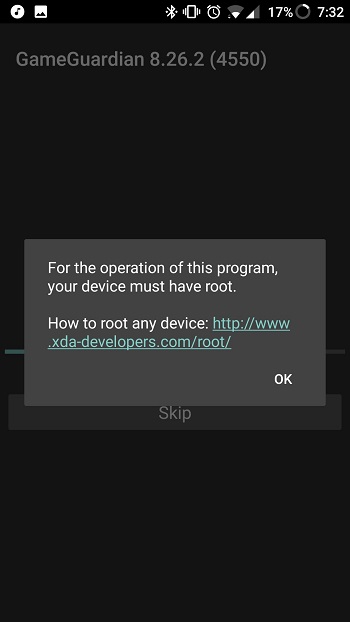
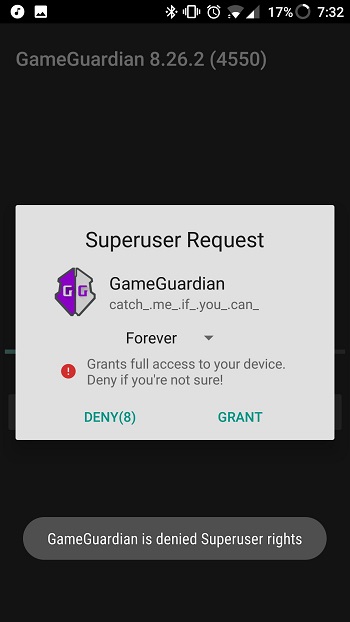
The app can work on rooted devices, selected virtual spaces, and popular Android emulators. This makes it more flexible for users who do not want to modify their main device system. Setup may still take patience, since compatibility depends on the Android version, emulator build, virtual space, game protection, and device architecture.
The biggest benefit of Game Guardian is control. It gives users detailed tools to test values, speed up repetitive offline tasks, and understand how certain game systems behave. The downside is that it can be confusing for beginners, may fail on protected online games, and can lead to account restrictions when used in multiplayer or server-based games. A little common sense goes a long way here.
Game Guardian is most suitable for Android users who like offline game tweaking, memory value testing, app behavior research, or emulator-based experiments. It is less suitable for competitive online games, accounts with valuable progress, or users who expect every game to work instantly. Used carefully, it is a practical tool for learning, testing, and changing local game values.
FAQs Game Guardian
What is Game Guardian used for?
+
Game Guardian is used to search and edit memory values in Android games and apps, such as coins, health, timers, points, and other local data.
Can Game Guardian APK work without root?
+
Yes, Game Guardian APK can work without root through supported virtual spaces, but features may be limited compared with rooted devices or compatible emulators.
Does Game Guardian support Lua scripts?
+
Yes, Game Guardian supports Lua scripts for automated searches, edits, freezes, filters, and batch actions, which helps advanced users save time.
Why does Game Guardian not work on some games?
+
Some games use server-side data, anti-cheat systems, encryption, or strict process protection, so Game Guardian may fail, crash, or show no useful results.
Who should use Game Guardian?
+
Game Guardian is best for Android users who want to test offline game values, study app behavior, or make controlled edits in emulators and virtual spaces.
Discover More Interesting Apps
-
 Mod
Mod
DiskWala
v26.8
123.89 Mb
Updated -
Neon App
v2.14.1
117.01 Mb
Updated -
HaloVPN
v20.1.3
93.33 Mb
Updated -
Panda Mouse Pro
v15
25.00 Mb
Updated -
Mod
Panda Gamepad Pro
v15
25.00 Mb
Updated -
Mod
Terabox
v4.27.5
252.70 Mb
Updated -
GearUP Game Booster
v4.0.9
19.38 Mb
Updated -
NIL Club
v5.1.12
167.85 Mb
Updated -
TikFinity
v2.7.4
91.39 Mb
Updated -
Mod
PigeonCast
v3.7.0
64.62 Mb
Updated










Share Your Thoughts